How I Find Real GraphQL Vulnerabilities (A Bug Hunter’s Honest Workflow)
I’ve wasted more hours than I’d like to admit running introspection queries against apps that had it disabled, waiting for the server to return something useful, and getting nothing back. If you’ve been in that spot too, this post is for you.
This is not a “GraphQL security checklist” article. I’m not going to tell you to enable GraphiQL and list your queries. What I’m going to walk you through is the actual workflow I use when I’m targeting a production GraphQL API one where introspection is off, the schema is hidden, and the frontend is your only real ally.
Everything here is built around authorized testing and defensive research. The goal is understanding, not damage.
If you haven’t read my JavaScript bundle analysis post yet, start there first. A lot of what I do in Step 1 below builds directly on that methodology.

Why Most GraphQL Security Articles Are Outdated
Here’s the reality of modern bug hunting: if your entire approach depends on introspection being enabled, you’re fishing in a pond that’s been fished out. Every serious target you’ll find in a bug bounty program has already had someone run __schema { types { name } } against it. The low-hanging fruit is gone.
What hasn’t been thoroughly exploited — because it requires more patience and a different mindset — is the logic layer. The state machines. The mutations that exist in the codebase but never appear in any normal user flow.
The difference between someone who keeps coming up empty and someone who consistently finds medium-to-high severity bugs in GraphQL applications usually comes down to one thing: the second person stopped relying on the server to tell them what exists.
| Common Approach | What Actually Works |
|---|---|
| Run introspection, get schema | Extract operations from JS bundles |
| Use GraphiQL to explore | Map mutations manually from source |
| List all queries and test each one | Prioritize state-changing operations |
| Trust the frontend restrictions | Verify backend enforcement independently |
| Look for injection | Look for logic flaws and state bypasses |
My Mental Model Before I Touch a Single Request
Before I open Burp Suite or grep through a single JS file, I think about what I’m actually looking for.
GraphQL is not the vulnerability surface. The operations are the vulnerability surface.
And specifically, I’m not interested in what the API exposes — I’m interested in what it can do that the frontend doesn’t advertise. That gap is where real bugs live.
I think of every GraphQL backend as a set of capabilities that the UI only partially surfaces. My job is to map the full capability set, then look for anything that behaves unexpectedly when accessed outside the normal UI flow.
Full backend capability set
         ↓
What the frontend exposes
         ↓
The gap ← this is where I focus
Step 1: Extract Everything the Frontend Knows
This is where I spend the most time, and it consistently delivers the most value.
Modern frontend applications — especially ones built with React or Vue — ship everything they might ever need in their JavaScript bundles. That includes GraphQL operations that are only triggered in rare conditions, admin-only flows, or legacy functionality that was never cleaned up.
My starting point is always the formatted webpack chunks. I look for patterns like these:
grep -r "mutation" . --include="*.js" -l
grep -r "operationName" . --include="*.js" -l
grep -r "graphql" . --include="*.js" -l
Once I have the files, I dig into what I find. A real example of what might be sitting in a bundle:
mutation UpdateOrganizationStatus($uuid: ID!, $params: UpdateOrgParams!) {
  updateOrganizationStatus(uuid: $uuid, params: $params) {
    uuid
    status
    reviewStatus
  }
}
That mutation might never appear when you browse the app as a normal user. But it’s there. And the fact that it’s in the bundle means the backend almost certainly handles it.
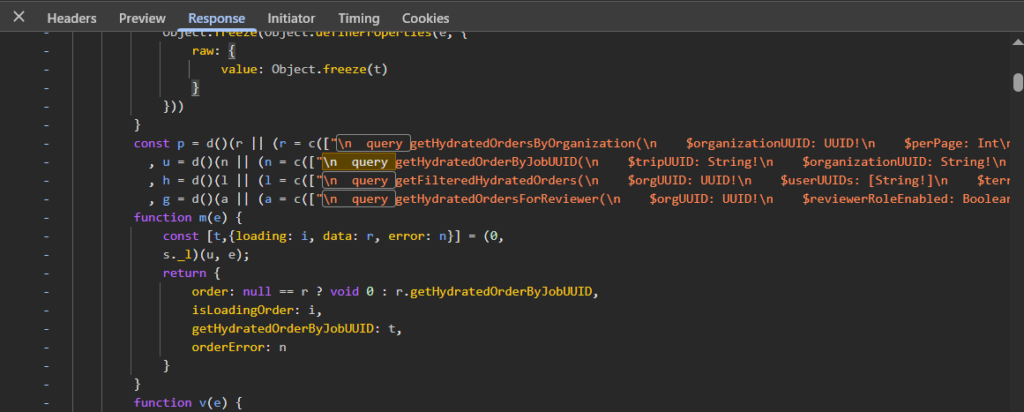
What to Search For
| Keyword | Why It Matters |
|---|---|
mutation |
Direct state-changing operations |
operationName |
Named queries/mutations that are sent over the wire |
graphql |
Import paths, client setup, tagged template literals |
variables |
Often appears near operation definitions with input shapes |
query { |
Inline queries, sometimes with sensitive field selections |
| Enum values | Status strings like PENDING, APPROVED, IN_REVIEW reveal state machines |
That last one, enum values : is something a lot of people miss. When you find a string like MANUAL_REVIEW_STATUS_IN_FRAUD_REVIEW buried in a bundle, that’s not noise. That’s the backend telling you exactly how its internal state machine is structured, even if that state is never reachable through normal UI.
Step 2: Understand the Request Layer
Before I start replaying anything, I take time to understand how the app actually sends its GraphQL requests.
The standard shape of a GraphQL request looks like this:
POST /graphql HTTP/1.1
Content-Type: application/json

{
  "operationName": "UpdateOrganizationStatus",
  "variables": {
    "uuid": "org-uuid-here",
    "params": {
      "status": "ACTIVE"
    }
  },
  "query": "mutation UpdateOrganizationStatus($uuid: ID!, $params: UpdateOrgParams!) { ... }"
}
But in production apps, this is almost always wrapped. There will be a request helper, a custom Apollo link, a middleware function , something that handles auth headers, session tokens, and sometimes rate limiting.
Finding that wrapper matters because it tells me:
- Where the auth token comes from (cookie, header, local storage)
- Whether there are any client-side checks before the request fires
- Whether the operation name is validated or just passed through
- How variables are shaped before being sent
Once I understand the wrapper, reproducing any request in Burp becomes straightforward.
Step 3: Separate Mutations From Everything Else
I categorize every operation I find into a simple two-column list. Queries on one side, mutations on the other. Then I put the queries aside — at least initially.
Mutations are where logic bugs live. They change state. They trigger processes. They interact with backend workflows that often have edge cases the developers didn’t fully think through.
| Operation Type | Risk Level | What to Look For |
|---|---|---|
| Query (read-only) | Lower — usually | IDOR, data exposure across accounts, over-fetching |
| Mutation (write) | Higher | Logic flaws, auth bypasses, state machine exploits, parameter tampering |
| Subscription | Variable | Authorization on real-time data, cross-account leaks |
This doesn’t mean queries are irrelevant — I’ve found solid information disclosure bugs in queries. But if I’m working against a time limit, mutations get my attention first.
Step 4: Read the Variables Like a Story
The operation name is the headline. The variables are the actual content.
When I see a mutation called UpdateBannedOrganization, that’s interesting. When I look at its variable structure:
{
  "uuid": "org-uuid",
  "params": {
    "manualReviewStatus": "MANUAL_REVIEW_STATUS_APPROVED",
    "reason": "Cleared after document review"
  }
}
Now it gets really interesting. I can see:
- The client is sending a status value directly
- That status is a string — meaning it might accept values outside the normal enum range
- There’s a
reasonfield that could be optional - The mutation operates on organizations, not users .. which means it’s probably in an admin or compliance flow
Each of those observations becomes a test. Not all at once — one at a time, cleanly.
Step 5: Never Skip the Frontend Context
This is the mistake I see most often in bug reports that don’t get triaged seriously: the researcher found a mutation, fired it with modified parameters, got an unexpected response, and called it a day without understanding what the mutation is actually supposed to do.
Before I test anything, I ask:
- When does the UI trigger this mutation?
- What permissions does the UI assume the user has at that point?
- Are there any conditions in the JavaScript that gate access to this functionality?
- What does the UI do with the response?
The gap I’m hunting for looks like this:
Frontend: "Only show this button to admin users"
Backend:  "Execute this mutation for any authenticated user"
That discrepancy , frontend restriction without backend enforcement — is where real authorization bypasses come from. But you only find it if you understand both sides.
Step 6: Map the State Machine
This is the part that genuinely separates deep findings from surface-level ones.
Almost every non-trivial application is a state machine underneath. An organization goes through onboarding → verification → active → suspended. An account moves from pending → approved → flagged. A document goes from submitted → under review → accepted or rejected.
When I find a mutation that modifies status or state, I immediately ask four questions:
- What are all the valid states this entity can be in?
- What transitions are supposed to be allowed?
- Does the backend enforce the order of those transitions?
- Can I trigger a transition that the UI would never allow?
Example State Machine Analysis
| Entity State | Normal Flow | Test: Can You Skip To It? |
|---|---|---|
| PENDING | Starting state on creation | — |
| UNDER_REVIEW | After submitting documents | Can you submit without documents? |
| APPROVED | After manual review passes | Can you call the approval mutation directly? |
| SUSPENDED | After a violation is flagged | Can you move from SUSPENDED to APPROVED without review? |
| BANNED | Final state after fraud detection | Can you self-serve your way out of this state? |
The most impactful bugs I’ve found in this category involve the last one — where an entity is in a terminal or restricted state, but a mutation exists that can modify its review status without re-triggering the verification process. That’s not a theoretical finding. It has real compliance and fraud implications.
Step 7: Persisted Queries Are Not a Dead End
Some applications use persisted queries — instead of sending the full operation text in every request, they send a hash or ID that maps to a pre-registered query on the server.
A persisted query request looks like this:
{
  "id": "a1b2c3d4e5f6",
  "variables": {
    "uuid": "org-uuid-here"
  }
}
Most people see this and assume they can’t do anything useful without knowing the hash-to-query mapping. That’s not entirely true.
Even when traffic is fully persisted, the JavaScript bundle usually still contains:
- The original operation text (used during development)
- The operation name (used for logging and error handling)
- The variable shape (needed to construct the request)
- Sometimes the hash itself alongside the query
I’ve also seen applications that only use persisted queries for some operations and fall back to full inline queries for others — especially internal tools and admin panels that were built separately from the main product.
The lesson: never assume the network view is the complete picture. The bundle almost always has more.
Step 8: Build an Operation Map Before You Test Anything
I don’t start testing until I have a map. It keeps me from repeating work, jumping between unrelated operations, and missing the connections between mutations.
Here’s what a basic map looks like for a hypothetical business portal:
| Operation | Type | Key Inputs | Notes | Priority |
|---|---|---|---|---|
| UpdateOrganizationStatus | Mutation | uuid, status | Status is client-controlled | 🔴 High |
| UpdateBannedOrganization | Mutation | uuid, params | Operates on banned entities — potentially bypasses review | 🔴 High |
| GetOrganizationDetails | Query | uuid | Cross-account test needed | 🟡 Medium |
| CreateOrganizationExport | Mutation | reportId, format | Async — check if result is accessible cross-account | 🟡 Medium |
| UpdateUserPreferences | Mutation | settings object | Low impact, skip for now | 🟢 Low |
This map costs maybe 30 minutes to build. It saves hours of disorganized testing. And it becomes the foundation of your report when you do find something.
Step 9: How I Actually Test (Without Making Noise)
My testing approach is deliberately slow. I’m not running scanners. I’m not fuzzing mutation inputs with wordlists. I’m making individual, deliberate requests and watching what changes.
For any mutation I want to test, my sequence is always:
- Baseline. Send the mutation exactly as the application would. Confirm it works as expected. Record the response.
- Single variable change. Modify one parameter at a time. Not two. Not three. One.
- Observe the response. Error messages. Status codes. Response body differences. Timing differences.
- Repeat. Move to the next parameter only after fully understanding the effect of the previous change.
This sounds slow. It is slow. But it also means I never get confused about what caused what, I never accidentally cause real damage by chaining actions I don’t understand, and my observations are clean enough to write up properly.
One thing I specifically look for when I change a state-related parameter: does the response change, or does the application just silently accept the new value without validation? Silent acceptance is almost always a finding.
Step 10: Validate Impact Before You Report
A mutation that accepts an unexpected value is interesting. A mutation that accepts an unexpected value and that unexpected value produces a meaningful state change with real-world consequences — that’s a finding worth reporting.
Before I write anything up, I ask:
- What does this look like from the perspective of someone exploiting it maliciously?
- What business process does it bypass or undermine?
- Is there a compliance, fraud, or financial angle?
- Can I reproduce it cleanly from scratch?
Triage teams are busy. Reports that clearly answer “so what?” get escalated. Reports that just say “I found a mutation that accepts undocumented input” get closed.
The Mistakes I Made Early On
Since this is supposed to be an honest post and not just a methodology document, here are the actual mistakes I made before I settled into the workflow above:
| Mistake | What Happened | The Fix |
|---|---|---|
| Relied entirely on introspection | Hit disabled introspection on every interesting target, found nothing | Moved primary recon to JS bundles |
| Tested mutations blindly | Caused state changes I didn’t understand, muddied my own test data | Always baseline first, one change at a time |
| Reported too early | Found an interesting mutation, reported before understanding impact, got downgraded | Now validate fully before writing anything up |
| Confused frontend visibility with importance | Wasted time on prominent but low-impact operations | Prioritize hidden operations over visible ones |
| Ignored enum values in bundles | Missed state machine structures that were sitting in plain sight | Now grep specifically for enum-looking strings |
Quick Reference: The Full Workflow
1. JS Bundle Analysis
   └─ Grep for mutations, queries, enum values, operationNames

2. Request Layer Mapping
   └─ Find the request wrapper, understand auth and variable structure

3. Operation Categorization
   └─ Split mutations from queries, prioritize mutations

4. Variable Analysis
   └─ Read input shapes, identify client-controlled sensitive fields

5. Frontend Context
   └─ Understand when and how each operation is triggered in the UI

6. State Machine Mapping
   └─ Identify all entity states, map expected transitions

7. Persisted Query Bypass
   └─ Look for operation structures even when traffic is hashed

8. Build Operation Map
   └─ Priority table: operation, type, inputs, notes, risk

9. Controlled Testing
   └─ Baseline → one change → observe → repeat

10. Impact Validation
    └─ Confirm real-world consequence before reporting
Final Thought
GraphQL is not harder to test than REST. If anything, it’s more consistent — once you understand the shape of an operation, you understand the whole surface it represents.
The real shift in thinking is this: stop asking the server what exists. Start asking the frontend what it knows. Those are two very different questions, and only one of them has an answer most of the time.
The frontend always talks. You just need to know how to listen.
If you found this useful, the follow-up post goes deeper into how I handle state machine analysis on specific real-world target types including what to do when an entity is in a terminal state and you suspect the backend’s enforcement is incomplete.